A lot of professionals ask this question, genuinely believing one makes the other redundant. They have a complete LinkedIn profile with recommendations, work history, a professional headshot, and 800 connections, so a digital business card feels like duplication. What exactly would the card add that LinkedIn does not already handle?
The honest answer is that they solve completely different problems, and conflating them is what confuses in the first place. Once you understand what each tool actually does, the question stops being either/or and becomes obvious.
What LinkedIn Actually Does and Does Not Do
LinkedIn is a discovery and credibility platform. When someone Googles your name, your LinkedIn profile usually appears in the top three results. When a recruiter wants to verify your work history or a prospect wants to see whether you are credible before taking a meeting, LinkedIn is what they check. The platform is built for asynchronous professional visibility, and it does that job better than anything else available.
What LinkedIn does not do well is give someone your phone number in a usable format. The platform deliberately makes direct contact details difficult to access because keeping people inside LinkedIn’s messaging system serves the platform’s interests rather than yours. If you want to share your email address via LinkedIn, you have to either add it to your profile and make it public to all members or expect every interested contact to send you a message through a system you may not check regularly.
The LinkedIn QR code limitations that most professionals discover too late are significant. LinkedIn’s built-in QR code sends the person who scans it to your LinkedIn profile page, where they then have to send a connection request, wait for you to accept, and then navigate to your contact info section only to find most of it hidden. That is three or four steps between someone asking for your contact details and actually receiving them. A one-tap save contact experience this is not.
The difference between a LinkedIn connection vs contact becomes concrete here. A LinkedIn connection exists inside LinkedIn’s ecosystem. A contact saved to your phone is yours and the relationship does not depend on a third-party platform to maintain it.
What a Digital Business Card Actually Does
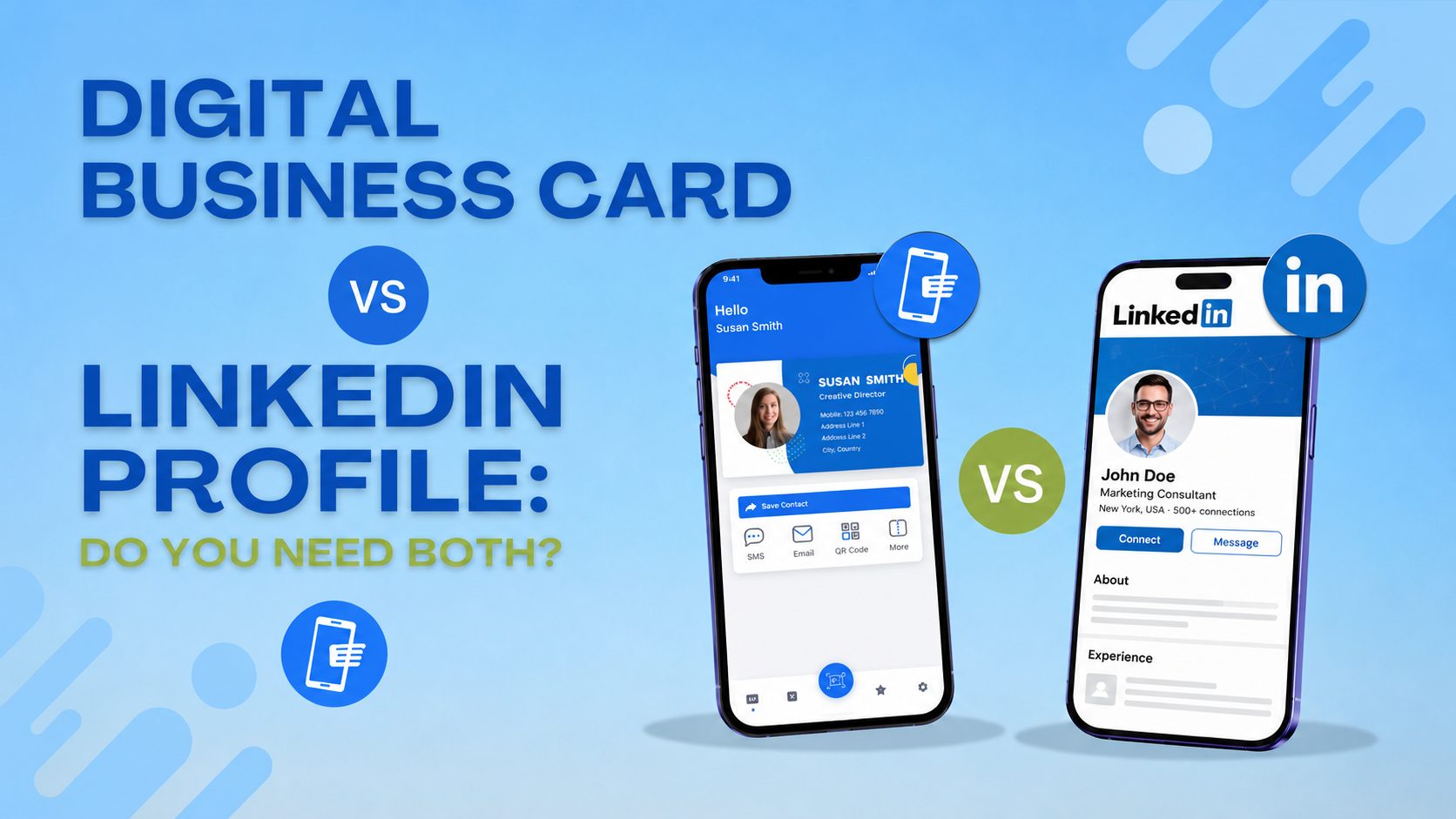
A digital business card for LinkedIn users solves the specific gap that LinkedIn creates. When someone scans your digital card, they land on a mobile-optimised page that gives them your phone number as a clickable dial button, your email as a clickable compose button, your website as a direct link and a single-tap save to contacts button that drops everything into their phone in one action. No connection request, no waiting for acceptance, no navigating through privacy settings to find a number that may or may not be listed.
The practical difference is this. You meet someone at a conference, have a good conversation, and they ask for your details. You show them a QR code from ShareEcard on your phone screen. They scan it, your card opens in their browser, and they save your number in under ten seconds. No app needed on their end, and the contact is now in their phone alongside every other contact they use daily rather than buried inside a platform they log into three times a week.
The question of how to share a phone number on LinkedIn gets asked frequently precisely because the platform makes it harder than it should be. A digital business card bypasses the problem entirely because sharing your number happens outside LinkedIn’s control.
The Comparison That Actually Matters
Can LinkedIn replace a business card? Wrong question. They serve different moments in the same professional relationship. Here is exactly how they split the work:
| Factor | LinkedIn Profile | Digital Business Card |
| Primary purpose | Long-term professional visibility and discovery | Instant direct contact exchange in the moment |
| When it works | Before you meet someone and during an ongoing relationship | The specific ten seconds when someone needs to reach you tomorrow |
| How people find you | Search engines, mutual connections, keyword discovery | QR code scan, shared link, email signature |
| Contact saving | Connection request sent and accepted first, then still buried in settings | One tap saves phone number and email directly to their phone |
| Phone number sharing | Hidden behind privacy settings by default | Visible and clickable immediately on scan |
| Credibility building | Work history, recommendations, endorsements, content | Professional design, portfolio link, photo, direct booking button |
| Relationship ownership | LinkedIn owns the connection between you and the other person | Contacts live in their phone independent of any platform |
| Works offline | No requires internet and a LinkedIn account to view | Yes, QR code scans open in any browser without an account |
| Updates | Edit your profile anytime | Edit your card once and every shared link reflects it instantly |
| Risk | Platform changes privacy settings or algorithms and access changes | No third party controls your direct contact relationship |
| Best use case | A recruiter searching your industry and a prospect verifying credibility before a meeting | Client you just met at a conference who needs your number right now |
The professional networking card 2026 reality is straightforward. LinkedIn handles the before and the during. A digital business card handles the moment. The two tools do not compete because they address completely different stages of the same professional relationship, and the professionals who understand this use both without hesitation.
What a Digital Business Card With LinkedIn Link Free Actually Looks Like
The most practical setup combines both tools on the same card. A free digital business card with LinkedIn link sits alongside your phone number, email, and website on a single shareable profile page. When someone scans your card, they can save your contact details directly or tap your LinkedIn button to send a connection request. One scan covers both actions.
ShareEcard lets you add your LinkedIn profile URL as a clickable link inside your digital card at no cost. Your card generates a permanent QR code and shareable URL that you put in your email signature, on your phone lock screen, and in your LinkedIn profile’s contact section as a direct link to your full contact details.
The share email via LinkedIn problem disappears when you add your digital card link to your LinkedIn featured section or About section. Anyone visiting your LinkedIn profile and wanting your direct email can click through to your card and access it immediately rather than sending you a message and waiting.
How the LinkedIn Profile vs Digital Profile Distinction Plays Out in Practice
Your LinkedIn profile is a public document about your career. It is visible to everyone and designed for people to find you through search. Your digital profile on your card is a direct contact page designed for people you have already met to reach you efficiently.
A recruiter who found you through a keyword search uses LinkedIn. A client you just met at a trade show uses your digital card. A journalist writing about your industry might find you on LinkedIn first and then want your direct number quickly. Your digital card handles that second step without requiring them to navigate LinkedIn’s messaging system.
The difference between a LinkedIn profile and a digital business card comes down to who controls the relationship. LinkedIn owns the connection between you and every person you have connected with on the platform. If LinkedIn changes its algorithm, its pricing, or its privacy settings or simply goes offline, your access to those connections changes with it. A contact saved to someone’s phone belongs to them and to you, and no platform decision affects it.
FAQs
Do you need a digital business card if you have LinkedIn?
Yes and the reason is practical rather than theoretical. LinkedIn does not give people your phone number in a usable one-tap format and its built-in QR code sends contacts to your profile rather than directly saving your details to their phone. A digital business card fills exactly this gap and takes under two minutes to set up for free.
Can LinkedIn replace a business card in 2026?
Not for direct contact exchange. LinkedIn works well for professional discovery and long-term visibility but it deliberately keeps direct contact details behind layers of navigation. A digital business card gives someone your phone number and email in a single tap which LinkedIn’s platform is not designed to do.
How do I share my phone number on LinkedIn?
The most effective approach is to add your digital card link to your LinkedIn profile’s featured section or contact info section. Anyone who wants your direct number clicks through to your card and accesses it immediately without you having to make your phone number fully public on LinkedIn’s platform.
What is the difference between a LinkedIn profile and a digital business card?
A LinkedIn profile is a long-form professional document visible to everyone and optimised for discovery through search. A digital business card is a short, direct contact page optimised for the moment of exchange when someone needs to save your details quickly. Both serve real purposes at different points in a professional relationship.
Is a free digital business card with LinkedIn link actually professional enough?
Yes. ShareEcard’s free plan produces a complete digital card that includes your LinkedIn as a clickable button alongside your phone, email and website. The card has no watermark and no indication to the recipient that it was created on a free plan. It looks and functions identically to paid alternatives for the person receiving it.